![[CGMZ] Jukebox for RPG Maker MZ](https://img.itch.zone/aW1nLzIxNzg3NTgyLnBuZw==/original/HbvTiL.png)
[CGMZ] Jukebox for RPG Maker MZ
A downloadable plugin
Hi all, introducing [CGMZ] Jukebox!
Quick Intro
Allow your player to collect musical tracks throughout the game, either manually or automatically when heard for the first time. Then, let them use a jukebox (new scene) to select a track they want to replay. Optionally allow them to permanently change the map's autoplay track by what is played in the jukebox.
Collection
Your player can collect musical tracks throughout your game, which they can then replay in the jukebox scene. This collection can occur manually by plugin command, or automatically when the player hears the track for the first time. You can also undiscover tracks in case you need that functionality (manual only).
Jukebox Scene
The jukebox scene will display discovered tracks the player has. From here, they can view information about each track they have discovered and select a track to hear it play again.
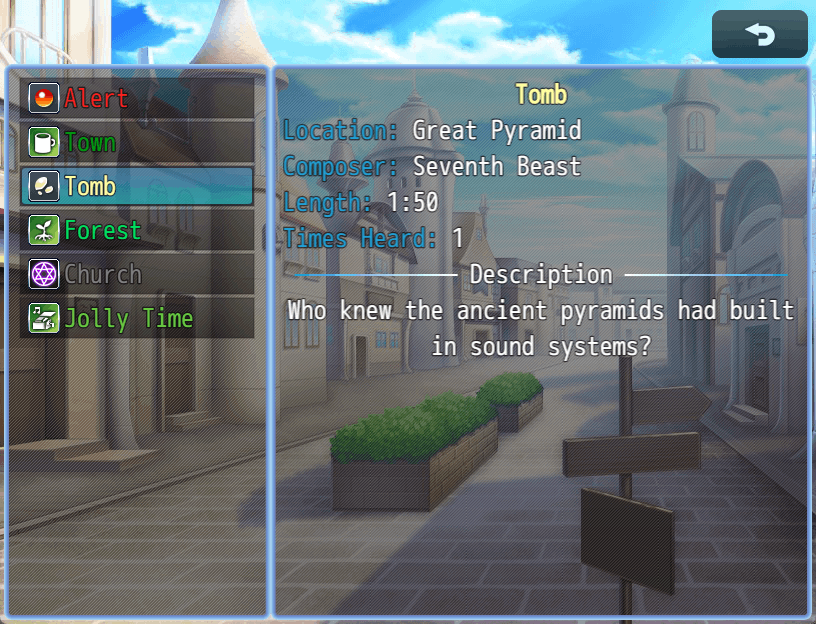
Flavor data in the jukebox scene currently includes things like the track name, composer, length, times heard, discover location, and a description. You can choose which lines you want in your scene and the order they are shown to the player, including various headers and spacing to separate your jukebox scene.
See below image for how the jukebox scene can look:
Flavor
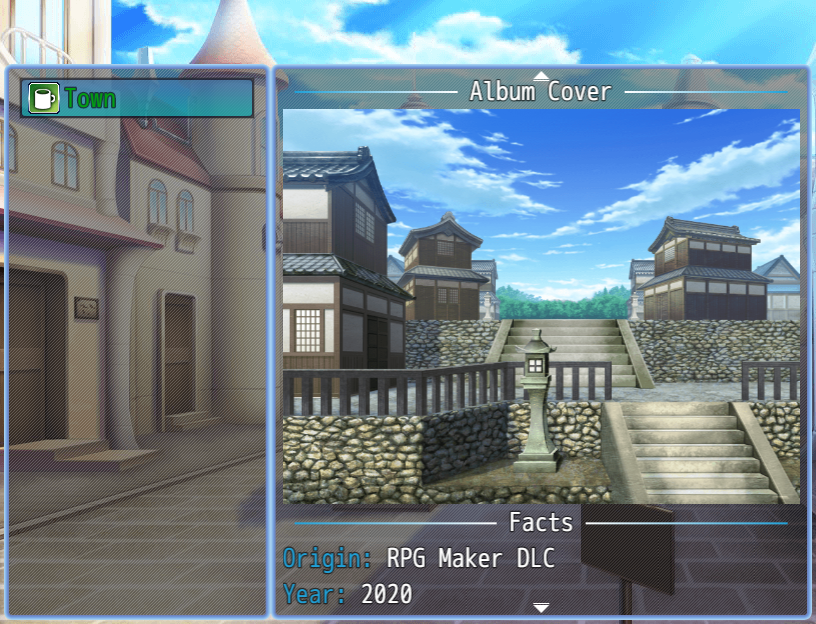
This plugin allows you to add as many custom headers, text lines, and images to your track displays as you want. This is set up through the arrays for flavor headers, texts, and images in each track's parameters. Then, determine where each piece of info displays by adding Flavor Header, Flavor Text, or Flavor Image line items in the Display Info parameter.
You can use this to add custom sections for album cover art or any other piece of flavor you'd like to add to your tracks. See below image for how it can look:
Integrations
This plugin has some integrations with other [CGMZ] Plugins. These are as follows:
[CGMZ] Scene Backgrounds - Provide a preset ID and show a custom background image in the jukebox scene. This can include a scrolling animated parallax image, weather, and more.
[CGMZ] Controls Window - Show a window letting the player know the controls of the jukebox scene which automatically switches between gamepad and keyboard controls depending on the player's last input type.
[CGMZ] Window Backgrounds - Provide a preset ID and show a custom image in each window's background, including support for a scrolling animated parallax image.
[CGMZ] Window Settings - Provide a preset ID and change each window's windowskin, tone, style, and more.
Roadmap
This initial alpha version will be improved upon through updates as with all my other plugins. The following features are planned (no particular order):
- Automatic length detection
- Progress bar in scene to show the current position in the track the player is listening to
- Categories in the jukebox
- Options to show undiscovered tracks
- Configurable jukebox scene arguments to make unique jukebox scenes.
Of course, if you have any more ideas to improve this plugin beyond what is listed above I would love to hear your suggestions. You can suggest things in the comments below or in the Casper Gaming Discord. I add all suggestions to my to-do list.
PLEASE READ BEFORE PURCHASING:
Please be aware that you can access this as well as all of my other Alpha plugins for $5 on my Patreon: https://www.patreon.com/CasperGamingRPGM
This is posted to Itch.io since some people only use Itch and are not aware my Patreon and all of my beta/alpha plugins exist, or want to have everything in one convenient location (itch.io), or do not want to do a monthly subscription.
Casper Gaming's Beta/Alpha plugins are treated as an "early access" and will eventually be free for everyone once they are fully released, though this process can take months/years. By purchasing in beta/alpha, you are able to provide early feedback/suggestions which are more likely to make it into the final fully released plugin.
Quick Facts
✅ RPG Maker MZ
✅ No obfuscation
✅ All future updates included
✅ No AI used at any point in the creation of this plugin
Support
Casper Gaming provides quick support to any user who needs it. You can leave a comment below with your question or issue, I try to check my itch.io at least once a day. For even quicker support, you can come into the Casper Gaming Discord and ask for help in the #support channel.
Credit & Requirements
Please see terms of use here: Terms of Use
Requires CGMZ Core plugin: CGMZ Core
Happy RPG Making!

Purchase
In order to download this plugin you must purchase it at or above the minimum price of $5 USD. You will get access to the following files:
Development log
- Version Alpha R2 Release NotesSep 06, 2025
- Alpha LaunchJun 21, 2025
Comments
Log in with itch.io to leave a comment.
Hey, is this possible to have this be called from your Menu Command plugin as well?
Yes you should be able to use js
Okay sweet, I was able to figure it out a bit after I posted, but I missed the prepareNextScene part.
Working great, thank you!
I am glad you got it working 😁the scene needs to be prepared, those arguments are for the "permanently change map music" "stop after scene exit" and "scene background" settings
I legitimately gasped when this showed up in my feed
I had been wishing for an MZ jukebox plugin for years now
(even tried to make one myself, but.. well, I still got a looong way to go until I can code plugins that aren't super simple XD)
This is exactly what I needed for my games, and you just made my entire day!
I'm going to purchase this alpha right away-- hell, I'll give you an extra $5 on top of the $5 alpha access price, because I'm so excited about it (and want to support you)!
Thanks for the support 😁! I am glad you like the plugin. If you have any ideas to further improve the plugin let me know, I add all suggestions to my to-do list.